Showing posts with label Software Engineering. Show all posts

Thursday, May 18, 2023

Can we connect Oracle Developer to a running instance of Mysql ?

 No, Oracle SQL Developer is primarily designed for connecting to and working with Oracle databases. It does not provide native support for connecting to MySQL databases.

However, there are alternative tools available that are specifically designed for connecting to MySQL databases. One popular option is MySQL Workbench, which is an official graphical tool provided by Oracle for MySQL database administration and development. MySQL Workbench allows you to connect to a running instance of MySQL and perform various tasks such as executing queries, managing database objects, and designing database schemas.

If you need to work with both Oracle and MySQL databases, you may consider using different tools for each database system. Oracle SQL Developer for Oracle databases and MySQL Workbench for MySQL databases. This allows you to leverage the features and capabilities specifically tailored for each database platform.

Does Oracle SQL Developer needs a running instance of the Oracle to be installed separately ?

 No, Oracle SQL Developer does not require a separate installation of the Oracle database server to be running. Oracle SQL Developer is a standalone graphical tool for database development and administration. It can be installed and used independently of the Oracle database server.

However, to connect Oracle SQL Developer to an Oracle database, you will need the necessary connection details such as the hostname, port number, database name, username, and password. These details are required to establish a connection to the Oracle database server from Oracle SQL Developer.

Once you have the connection details, you can configure a new connection in Oracle SQL Developer and connect to the Oracle database server to perform various tasks such as executing SQL queries, managing database objects, and developing database applications.

Wednesday, May 17, 2023

 Certainly! Here are five daily tips for programmers to enhance their productivity and effectiveness:

  1. Plan and prioritize your tasks: Start your day by creating a to-do list and prioritizing your tasks. Identify the most critical and time-sensitive projects or issues and allocate your time accordingly. Breaking down your work into manageable chunks will help you stay focused and organized throughout the day.
  2. Practice focused work: Minimize distractions and create a conducive work environment to maximize your concentration. Turn off notifications on your phone or computer, close unnecessary tabs, and find a quiet space to work. Consider using productivity techniques like the Pomodoro Technique, where you work in focused sprints followed by short breaks to maintain your productivity levels.
  3. Continuously learn and improve: The field of technology is constantly evolving, so it's crucial to stay updated with the latest developments. Dedicate some time each day to learn new programming languages, frameworks, or tools. Explore online resources, tutorials, and forums to expand your knowledge and skills. Additionally, consider participating in coding challenges or joining programming communities to engage with fellow developers.
  4. Write clean and maintainable code: Aim for writing clean, modular, and easily understandable code. Follow best practices and coding conventions specific to your programming language or framework. This will make your code more maintainable, readable, and less prone to bugs. Consider using code review tools or collaborating with colleagues to get feedback and improve your coding style.
  5. Take care of your physical and mental well-being: Programming can be mentally demanding, so it's essential to prioritize your well-being. Take regular breaks, stretch your legs, and practice physical exercises to prevent stiffness and eye strain. Additionally, make time for hobbies or activities that help you relax and recharge. Remember to maintain a healthy work-life balance to avoid burnout and maintain your productivity in the long run. Remember, these tips are not limited to just daily routines; they can be incorporated into your overall programming practices to foster continuous growth and success in your career.

Monday, May 15, 2023

Is it faster and efficient to sort a list of data in the backend or the frontend ?

 The decision of whether to sort a list of data in the backend or frontend depends on various factors, including the size of the data, the available server resources, and the specific requirements of your application. Here are some considerations:


Sorting in the Backend:


  • Efficiency: Sorting large datasets in the backend can be more efficient if the backend server has more processing power and resources compared to the client devices.
  • Bandwidth: Sorting on the backend reduces the amount of data sent over the network since the sorted data is already prepared before sending it to the client.
  • Consistency: Sorting on the backend ensures consistent sorting across different client devices since the sorting logic is centralized.

Sorting in the Frontend:


  • Responsiveness: Sorting on the frontend allows for quicker rendering and immediate feedback to the user while waiting for other backend operations to complete.
  • Flexibility: Sorting on the frontend gives you the ability to provide different sorting options and let users dynamically change the sorting criteria without making additional requests to the backend.
  • Reduced Backend Load: Sorting on the frontend can offload the computational load from the backend server, allowing it to focus on other critical tasks.

In practice, it's common to utilize a combination of sorting in both the backend and frontend. For instance, if you have a large dataset, the backend can provide an initial sorting based on a default criterion. Then, the frontend can provide additional sorting options and perform sorting operations on the already retrieved data, offering flexibility and interactivity to the users.


Ultimately, the best approach depends on your specific use case, performance considerations, and trade-offs between backend and frontend capabilities. It's recommended to analyze the specific requirements and constraints of your application to determine the most suitable approach.

Monday, February 15, 2016

Why does a Servlet has no constructor ?

A Servlet class does not have a constructor because a programmer never instantiate it. Rather the container creates instances whenever it is  needed.

Wednesday, October 28, 2015

Cygwin Terminal Clear Screen Command

Are you working with Cygwin and wondering how you can clear your terminal's screen ?
No need to install any extra packages , the following keys combination will do the job.

  1.  Ctrl + L
  2.  ALT + F8

Have Fun !

Wednesday, October 21, 2015

Install a new package after Cygwin installation

Have you installed Cygwin and  looking for how to install extra packages without using the setup again ? Then it is possible and apt-cyg is your friend :).
How ?
Yes in fact this package is similar to the apt-get you have in linux .
Just launch your cygwin terminal and fire the following command.

lynx -source rawgit.com/transcode-open/apt-cyg/master/apt-cyg > apt-cyg
chmod +x apt-cyg
mv apt-cyg /usr/local/bin/
apt-cyg install bc

I found these commands very helpful and all prizes go to Knorv from stackexchange.
Then have fun !!!

Sunday, September 13, 2015

Android reload database on resume or restart.

This scenario happens when , say we have two activities A and B.
From A we go to B and update the database. Then when we comeback at A
we notice that the A is not updated.
We have to implement the OnRestart in A, so that when the BACK button is pressed our
database is reloaded.

      @Override
    public void onRestart()
    {
        super.onRestart();
        finish();
        startActivity(getIntent());
    }


You can also try OnResume too


     @Override
    public void onResume() {
        super.onResume();  // Always call the superclass method first
        finish();
        startActivity(getIntent());

    }


This is just a trick, hope it paved your way out. 

Wednesday, September 9, 2015

Modulo Operator in Structured Text

 If you are reading this post, I am sure that you have other programming language background and have to fire the %  operator in your IF ELSE condition.
 But rather the equivalent operator for structured text you should use is MOD operator.
So instead of writing
 IF ( ( myVar % 10 ) == 0 ) THEN

 You should

IF ( ( myVar MOD 10 ) = 0 ) THEN

I hope that you are going to continue peaceful your journey to your project in automation.

Happy coding day !!


Wednesday, September 2, 2015

First PLC experience of a Computer Science Student

It has been a couple of months that I have been involved in PLC. I am computer science graduate used to mainly Soft-Programming. So far I have done essentially high level programming with languages such as java, C/C++ , PHP, Python and more.
After many hesitations I have decided to take an offer involving Hardware programming.
It has been my first time dealing with this complex type of programming. I have been really surprised by lack of documentation online on this important area of industrial automation. The few I even got were not free. If you are reading this post I am sure that you faced a similar scenario.  My intention starting this series of posts is to share with you whatever experiences and resources I assume useful, therefore giving back my contributions to this evolving community. I will be glad to know that whatever I share here is useful to my readers. The next post is coming soon, please feel free to drop a line of comment.

Saturday, May 16, 2015

Exam registration system on Java MVC pattern

I recently played around the mvc pattern in Java 8. I have implemented a small exam registration system having two views : student and teacher views. It detects duplicate registration and check that the student ID is in the form xxxxyyyy where x = letter and y= digit.
Here is a package diagram with calculated instability.

Here are some views:
CONTROL PANEL:

STUDENT:

TEACHER:

Source Code:
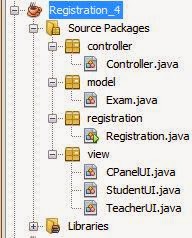
Project structure:


Registration


        package registration;

import controller.Controller;
import view.CPanelUI;

public class Registration {
    public static void main(String[] args) {
       
       Registration registration = new Registration(); 
        
    }
    //Main Frame call
    public Registration(){
       new CPanelUI( new Controller().getListOfIds()).setVisible(true);
    }
}


Exam


       package model;

import java.util.ArrayList;

public class Exam {
    
    //Students list declaration
   private  ArrayList  students = new ArrayList(); 
  
   // Adding an id to the list
   public void addStudent(String id){
       students.add(id);
   }
   
   //Returning the list of students IDs
   public ArrayList getStudents(){
       return students;
   }
   
   //Setting the list of students IDs
   public void setStudents(ArrayList  students){
       this.students=students;
   }
   
}

  
Controller

      
package controller;

import java.util.ArrayList;
import javax.swing.JOptionPane;
import model.Exam;

public class Controller {
    Exam exam = new Exam();
     
    
    public Controller(){
             
    }
    
    public void setList(ArrayList list){
        exam.setStudents(list);
    }
    public ArrayList getListOfIds(){
        return exam.getStudents();
    }
    
    public void register(String id){
        
       //Checking ID format
           if(checkIdFormat(id)==false){
             JOptionPane.showMessageDialog(null, "INVALID ID FORMAT");
           }
           else{
              
               //Checking ID Duplication
              if(checkIdDuplicate(getListOfIds(),id)==true){
                JOptionPane.showMessageDialog(null, "ID DUPLICATED");
              }
              else{
                  //Adding new id to the list
                   exam.addStudent(id);
                   JOptionPane.showMessageDialog(null, id+ " successfully registered for the exam !");
               }
                
           }         

    }
    
    
    public boolean checkIdFormat(String id){
     //Check if the ID contains 4 letters followed by 4 digits
       if(id.matches("^[a-zA-Z]{4}[0-9]{4}$")) {
           return true;
        } else {
           return false;
        }
    }
    
    
    public boolean checkIdDuplicate(ArrayList list, String id){
        // check whether the id exists in the list or not
        if(list.indexOf(id)==-1){
            return false;
        }else{
            return true;
        }
    }
}


CPanelUI

      
   package view;

import java.awt.FlowLayout;
import java.util.ArrayList;
import javax.swing.BoxLayout;
import javax.swing.JButton;
import javax.swing.JFrame;
import javax.swing.JLabel;
import javax.swing.JPanel;

public class CPanelUI extends JFrame{
    private final JLabel lblTitle = new JLabel("Teacher UI");
    private final JButton btnStudent = new JButton("Student");
    private final JButton btnTeacher = new JButton("Teacher");
       
    public CPanelUI (ArrayList list){
        setSize(300,300);
        setLayout(new FlowLayout());
        setTitle("Control Panel UI");
        JPanel panel = new JPanel();
        panel.setLayout(new BoxLayout(panel, BoxLayout.Y_AXIS));
        panel.add(lblTitle);
        panel.add(btnStudent);
        panel.add(btnTeacher);
        add(panel);
 
        btnStudent.addActionListener(
          ev->{
           dispose();
           new StudentUI(list).setVisible(true);
          }
        );
        
        btnTeacher.addActionListener(
         ev -> {
          dispose();
          new TeacherUI(list).setVisible(true);
         
         }
        );
         //uses the default look and feel specified by windows themes
        setDefaultLookAndFeelDecorated(true);
        //centered the window position
        setLocationRelativeTo(null);
        setDefaultCloseOperation(JFrame.EXIT_ON_CLOSE);  
    }
    
}


StudentUI

      
   package view;

import controller.Controller;
import java.awt.FlowLayout;
import java.util.ArrayList;
import javax.swing.BoxLayout;
import javax.swing.JButton;
import javax.swing.JFrame;
import javax.swing.JLabel;
import javax.swing.JPanel;
import javax.swing.JTextField;

public class StudentUI extends JFrame {
    private final JLabel lblId = new JLabel("Enter your ID (4 letters and 4 digits): ");
    private JTextField txtId = new JTextField(10);
    private final JButton btnId= new JButton("Submit ID");
    Controller controller = new Controller();
    public StudentUI (ArrayList list){
        //setVisible(true);
        setSize(300,300);
        setLayout(new FlowLayout());
        setTitle("Student UI");
        JPanel panel = new JPanel();
        panel.setLayout(new BoxLayout(panel, BoxLayout.Y_AXIS));
        panel.add(lblId);
        panel.add(txtId);
        panel.add(btnId);
        add(panel);
        btnId.addActionListener(
         ev -> {
           String id = txtId.getText();
           controller.setList(list);
           controller.register(id);
           dispose();
           new CPanelUI(list).setVisible(true);
           }
        );
        //uses the default look and feel specified by windows themes
        setDefaultLookAndFeelDecorated(true);
        //centered the window position
        setLocationRelativeTo(null);
        //setDefaultCloseOperation(JFrame.EXIT_ON_CLOSE);
    }
    
}


TeacherUI

   
   package view;

import java.awt.FlowLayout;
import java.util.ArrayList;
import javax.swing.BoxLayout;
import javax.swing.JButton;
import javax.swing.JFrame;
import javax.swing.JLabel;
import javax.swing.JList;
import javax.swing.JPanel;
import javax.swing.JScrollPane;

public class TeacherUI extends JFrame{
    private final JLabel lblTitle = new JLabel("Teacher UI");
    private final JButton btnBack = new JButton("Back");
    private final JList listIds ;
    //passing model to UI
    public TeacherUI(ArrayList list){
        listIds = new JList(list.toArray());
        setSize(300,300);
        setLayout(new FlowLayout());
        setTitle("Student UI");
        JPanel panel = new JPanel();
        panel.setLayout(new BoxLayout(panel, BoxLayout.Y_AXIS));
        panel.add(lblTitle);
        panel.add(new JScrollPane(listIds));
        panel.add(btnBack);
        add(panel);
        listIds.setFixedCellWidth(300);
         btnBack.addActionListener(
         ev -> {
             setVisible(false);
             new CPanelUI(list).setVisible(true);
           }
        );
         //uses the default look and feel specified by windows themes
        setDefaultLookAndFeelDecorated(true);
        //centered the window position
        setLocationRelativeTo(null);
    } 
}


Althought this system is working properly and following all the stable dependencies principles, we to add an observer pattern between views and the model to make it more scalable. And that is the next thing I will add to this system. Stay tuned. Feel free to drop your comments...

Note: This is project built on Java 8

inner class initialization and instantiation in C++/CPP

The following snippet shows you how to handle inner class in C++, especially the initialization and the instantiation.  It is important to note that the public inner class members are accessible outside the outer class while the private inner class members are accessible only inside the outer class. Please have a look at the code !


Hope you enjoy it !

Monday, May 11, 2015

Cool tools for UML diagrams drawing for java, cpp and others.

Hi,
Recently I have come across the following tools for drawing different UML diagrams. If you are using OOP like Java , CPP and others then these free tools are suitable for you.
  1. VISUAL PARADIAGM
  2. MODELIO
  3.  ???
This list is not exhaustive please I have USED any such tool please share your experience with us.

Thursday, February 19, 2015

What is JSON ?

JSON stands for Javascript Object Notation.
Some descriptions are:

  • Format for sharing data
  • Derived from Javascript
  • Language independent (Originated with Js but availabe in many other language like PHP, C, Pearl, python)
  • An alternative to XML

Advantages:
  •  Leaner than XML
  • Easy to read
  •  Growing support in APIs
  • Natural format for Javascript
  • Implementation in many languages

Wednesday, January 14, 2015

Add a CSS file in Intrexx

As you already know you can directly write your CSS code in intrexx without any issue. But if  you have, say a third-party CSS library or a CSS file that you want to add in intrexx you need to be aware of the following fact:
  1. Put a copy of your CSS file preferably in this directory or any other location:  \org\yourPortalName\external\htmlroot\include\custom\
  2. Open the following CSS file (\org\deinportal\external\htmlroot\include\custom\custom.js) and add the following:  
    Loader.loadCssFilesOnDemand('yourCssFile.css');
  3. Save everything and reload  your application
Enjoy it.

adding jquery plugin in intrexx

As you already know you can directly write your javascript code in intrexx without any issue. But if  you have say a third-party javascript library or a jquery plugin that you want to add in intrexx you need to be aware of the following fact:
  1. Put a copy of your plugin in this directory:  \org\yourPortalName\external\htmlroot\include\custom\
  2. Open the following js file (\org\deinportal\external\htmlroot\include\custom\custom.js) and add the following:  Loader.loadJsFileOnDemand("include/custom/yourScriptName.js");
  3. Save everything and reload  your application
Enjoy it.