#includestruct Array2D { int array[3][3]; }; struct Array2D matrixMultiplication(struct Array2D a, struct Array2D b) { struct Array2D result {0}; int i, j, k; for (i = 0; i < 3; i++) { for (j = 0; j < 3; j++) { result.array[i][j] = 0; for (k = 0; k < 3; k++) { result.array[i][j] += a.array[i][k] * b.array[k][j]; } } } return result; } int main() { struct Array2D a = { {{1, 2, 3}, {4, 5, 6}, {7, 8, 9}} }; struct Array2D b = { {{9, 8, 7}, {6, 5, 4}, {3, 2, 1}} }; struct Array2D c = matrixMultiplication(a, b); // Print the result printf("Result of matrix multiplication:\n"); for (int i = 0; i < 3; i++) { for (int j = 0; j < 3; j++) { printf("%d ", c.array[i][j]); } printf("\n"); } return 0; }
Sunday, February 19, 2023
How to return a 2-Dimensional array in C using a Structure
In C, it is not possible to return a 2-D array directly. However, we can return a struct that contains a 2-D array. Here's an example function that creates a 2-D array of integers and returns it as part of a struct:
We could also write similar function which return a pointer instead of structure See this post

Friday, February 17, 2023
What is React Child to Parent communicaiton ?
In React with TypeScript, child-to-parent communication is typically achieved by passing callbacks from the parent component to its child components as props. The child component can then call the callback to send data or events back to the parent component.
Here's an example of how this might look in code:
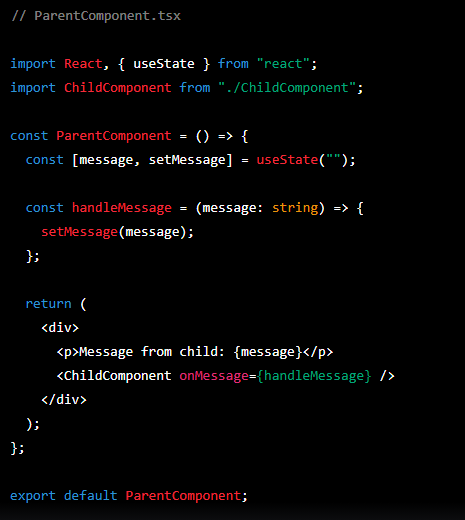

In this example, the ChildComponent receives a onMessage callback function as a prop from its parent ParentComponent. When the user submits the form in the ChildComponent, the handleSubmit function is called and it calls the onMessage callback with the current value of the input field.
The ParentComponent handles the onMessage callback by setting the message state to the value passed by the child component. This causes the ParentComponent to re-render with the updated message value, which is then displayed on the screen.
This is a simple example, but it demonstrates the basic concept of passing callbacks from a parent component to its child components in React with TypeScript, and using those callbacks to send data or events back to the parent component.
What is React Parent to child communicaiton ?
In React with TypeScript, parent-to-child communication is typically achieved by passing props from the parent component to its child components.
When a parent component renders a child component, it can pass data or functions to the child component using props. The child component can then access this data or functions through its props and use them as needed.
Here's an example of how this might look in code:


In this example, the ParentComponent passes two props to the ChildComponent: the count variable and the handleIncrement function. The ChildComponent then renders a button that calls the onIncrement function when clicked, and also displays the count prop.
This is a simple example, but it demonstrates the basic concept of passing data and functions from a parent component to its child components in React with TypeScript.
what is side effects and lifecycle in React ?
In React with TypeScript, a "side effect" refers to any behavior that occurs outside the component's render cycle, such as modifying the DOM, making an API request, or updating a global state.
In functional components, side effects are managed using the useEffect hook. This hook allows you to perform an action when the component mounts, updates, or unmounts. Here's an example of using useEffect to fetch data from an API:

In this example, the useEffect hook is used to make an API request when the component mounts, and updates the data state with the response. The second argument to useEffect is an array of dependencies, which determines when the effect should run. An empty array means it only runs once, when the component mounts.
The "lifecycle" of a component refers to the different stages it goes through from creation to removal. In class components, these stages are defined by a set of lifecycle methods, such as componentDidMount, componentDidUpdate, and componentWillUnmount. In functional components, the useEffect hook is used to manage these stages.
The React component lifecycle can be represented by the following methods:
- componentDidMount: called once when the component is first mounted
- componentDidUpdate: called after the component updates (i.e. state or props change)
- componentWillUnmount: called when the component is about to be removed from the DOM
In functional components, you can use useEffect to perform similar tasks. The useEffect hook can be used to mimic the behavior of all three of the above methods:
- useEffect(() => { ... }, []) - mimics componentDidMount
- useEffect(() => { ... }) - mimics componentDidUpdate
- useEffect(() => { return () => { ... } }) - mimics componentWillUnmount
Thursday, February 16, 2023
what is a Hook in React ?
In React TypeScript, a hook is a special function that allows functional components to use state and other React features that were previously only available in class components.
Hooks allow you to reuse stateful logic across multiple components without having to use higher-order components or render props. They also help to keep the logic of a component separate from its presentation, making your code more modular and easier to maintain.
Some commonly used hooks in React TypeScript include:
- useState: allows you to add state to functional components
- useEffect: allows you to add side effects (e.g., data fetching, event listeners) to your components
- useContext: allows you to access a context object created by a ContextProvider component
- useRef: allows you to create a mutable reference that persists across renders
- useReducer: an alternative to useState that allows you to manage more complex state in a functional way .
To use a hook in a functional component, you simply call it at the top level of your component, and then use the values it returns in your JSX. For example:
 In the example above, we're using the useState hook to add state to our Counter component. The hook returns an array with two values: the current state value (count) and a function to update the state (setCount). We then use these values to display the current count and update it when the button is clicked.

Subscribe to:
Posts (Atom)